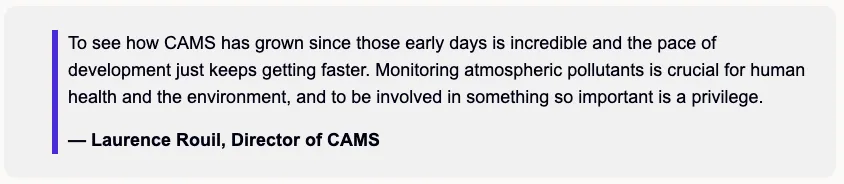
Testimonial content
version 0.1 Read time 1m 11s
Purpose
A Testimonial content row presents a quote from a partner, beneficiary, Commission official, or other named person. Use it to add an external voice to the page. This content block has two fields.
When to use
Use it for a short, approved, on-the-record statement that supports the page’s message or evidence. One testimonial near the results or conclusion is usually sufficient. Do not use anonymous, unverified, or unattributed statements.
Steps
1. Add the content block
In Content items, click Add Testimonial content row.
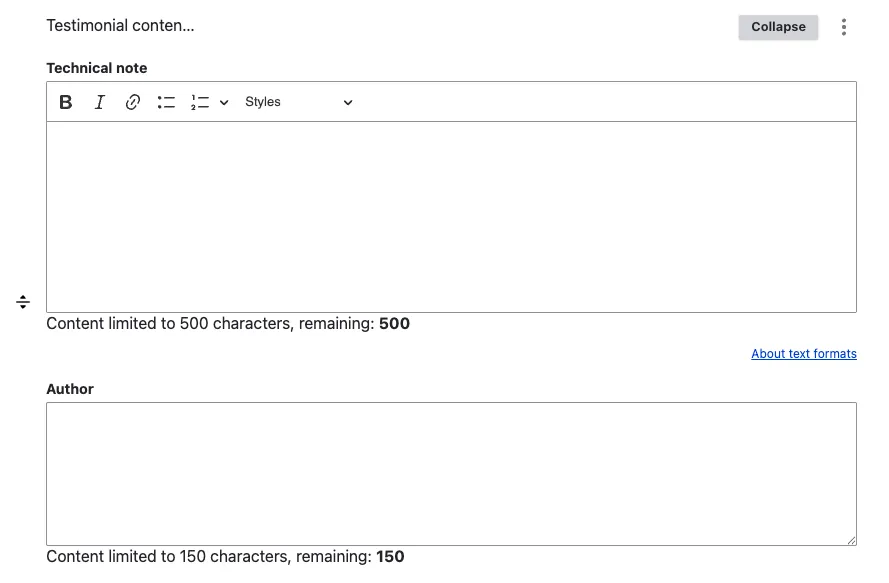
A sub-form opens with two fields:
- Author — the attribution line. Enter the speaker’s name, role, and organisation in the same field: “Maria López, Director, Maritime Agency of Spain”.
- Technical note — the public-facing quotation. Use the rich-text editor.
2. Save
Click Save on the page-editing form.
Field explanations
| Field | What editors should enter or select |
|---|---|
| Author | The speaker’s name, role, and organisation in one line, for example “Maria López, Director, Maritime Agency of Spain”. |
| Technical note | The public-facing quotation. Despite the field name, this text is displayed to visitors. |
Common mistakes
- Anonymous quote. “A user said …” reads as fabricated. Always name the speaker and their organisation in the Author field.
- Long quote. Two sentences max. Cut ruthlessly — testimonials work by punchy clarity, not paragraphs of testimony.
- Treating Author as just a name. It’s a free-text field — bundle name + role + organisation. The front-end renders the whole string under the quote.
Tips
- For a use case, place the testimonial inside the Results and impacts section — the quote earns its impact after the metrics.
- For a landing page, one testimonial near the bottom adds credibility without overshadowing the editorial message.
- The current implementation does not expose separate fields for speaker portrait, role and organisation. Pack everything you want shown into the Author string.
Example
The following example shows a short quotation with a complete attribution.