Content workflow
version 0.1 | Read time 1m 34s
The EU Space portal uses a four-stage editorial workflow, called Content Moderation in Drupal. It applies to editorial pages such as News, Events, Resources, Funding opportunities, Image of the day, Use cases, and Structured templates. Listing pages do not use this workflow; they are published immediately when saved.
States
| State | Published? | Purpose |
|---|---|---|
| Draft | No | Work in progress. Created automatically when a page is first saved. |
| Needs Review | No | Editor has finished and is asking a colleague / lead to review. |
| Published | Yes | Live on the public site. |
| Unpublished | No | Was once live but has been retired. Kept for archival / re-publishing. |
The default state for a new page is Draft.
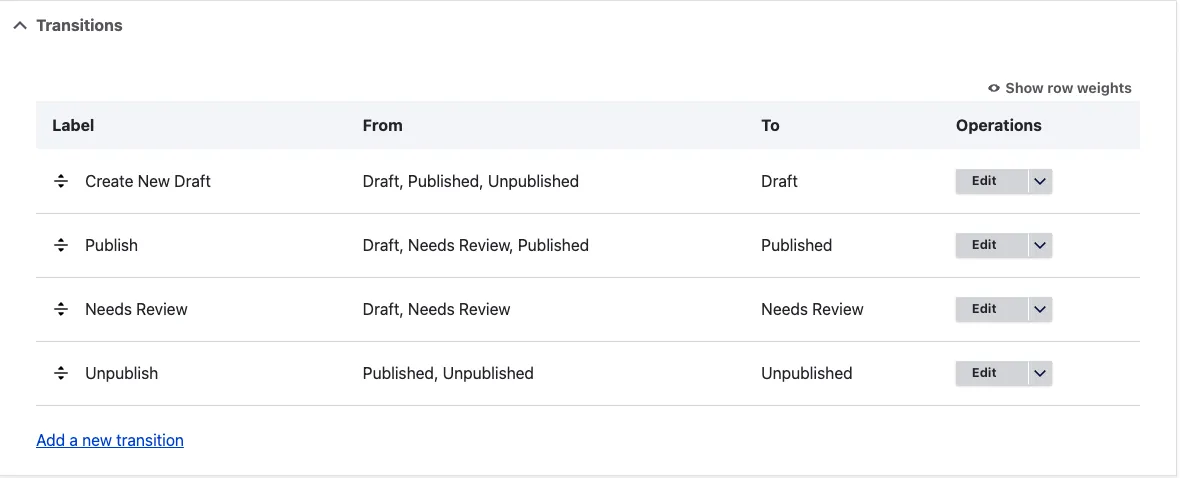
Transitions
- Create New Draft — Draft / Published / Unpublished → Draft. Use this to create a new working version of a live page without changing the version visitors can see.
- Needs Review — Draft / Needs Review → Needs Review.
- Publish — Draft / Needs Review / Published → Published. Use Published → Published when you want to push a working revision live without going through Needs Review.
- Unpublish — Published / Unpublished → Unpublished.
Typical editorial flow
- Create a page using Add content on the content dashboard. It is saved as Draft.
- Edit the working draft as many times as needed.
- Move to Needs Review when it is ready for a colleague to check. The reviewer can preview the page at its normal URL, but the draft remains hidden from public visitors.
- Publish when approved.
- To change a live page without affecting the public version, use Create New Draft. Your edits remain private until you publish them.
- Unpublish content that has been retired, such as an ended event or closed programme. Unpublished pages remain in the Content dashboard and can be republished later.

Note - on access control
What you can do at each stage depends on your role and on the organisation assigned to the page. Editors can only manage content belonging to their organisation. See Access control.