Access control
version 0.1 | Read time 1m 16s
EU Space restricts editing access by organisation. Each editor is assigned to an organisation, and editors can only manage pages assigned to that same organisation.
The rule to remember
The organisation on your account must match the organisation on the page:
- They match — you can edit the page, subject to your role.
- They do not match — Drupal denies the action.
If a page or editing button is missing, first check that your account has the correct organisation and role.
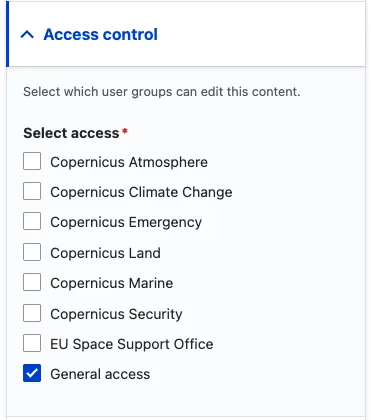
Organisations used for access
Each editor account is assigned to one of the following organisations:
- Copernicus Atmosphere
- Copernicus Climate Change
- Copernicus Emergency
- Copernicus Land
- Copernicus Marine
- Copernicus Security
- EU Space Support Office
- General access
Setting the organisation on a page
- In the right-hand sidebar of the editing form, find Access control / Organisation.
- Select your organisation. If your account has one organisation, Drupal normally selects it automatically when you create the page.
- Save the page. You cannot select an organisation that your account is not allowed to use.
Transferring a page
Editors cannot transfer a page to another organisation after the organisation has been set. Ask a site administrator to make the change.
Content managers
Content managers can edit pages belonging to any organisation. This elevated role is reserved for DG DEFIS and the technical team responsible for the website.
How Drupal applies the rule
Drupal checks the organisation saved on your account against the organisation saved on the page. This check is provided by the defis_space_program_perm_term_ext module.
Two exceptions explain why a page may behave differently:
- A user with the
administer nodespermission can edit pages without passing the organisation check. This permission is normally limited to site administrators. - If an older or migrated page has no organisation saved under Access control, Drupal uses its standard role permissions instead. Ask a site administrator to add the correct organisation rather than relying on this fallback.